
The right microphone stand keeps your mic positioned consistently, reduces desk clutter, and helps prevent unwanted bumps during live broadcasts. This roundup covers 10 options for creators using USB microphones, podcasting gear, and streaming setups.
We included desktop stands, boom arms, tripod floor stands, and models with phone or tablet holders so you can match the stand to your space, microphone, and content style.
Best 10 Microphone Stands for Live Streaming Picks for 2026
Best Desk-Mounted Pick
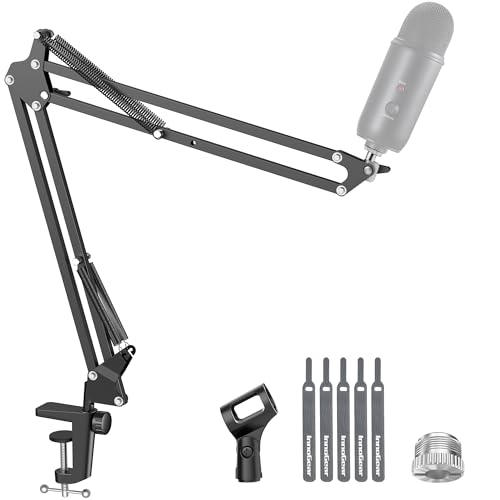
- Flexible 360° positioning
- Supports up to 3.3 pounds
- Folds away for storage
Best For: Streamers with a flat-edged desk
Best Two-Station Value
Adjustable Mic Stands with Tablet Holders

- Includes two microphone stands
- Holds 4.7- to 10.6-inch devices
- Height adjusts to 59 inches
Best For: Two-person streams and presenters
Best Space-Saving Floor Stand

- Flat 5.5-pound weighted base
- Adjusts from about 30 to 70 inches
- Includes tray and cable clips
Best For: Tight streaming and recording spaces
Best Compact Pick

- Weighted base with non-slip pads
- Adjusts from 5.5 to 8.26 inches
- Includes 3/8-inch and 5/8-inch thread compatibility
Best For: Desktop streaming, podcasting, and recording
Best Floor Stand
InnoGear TS186 Tripod Boom Stand

- 28.1- to 89.8-inch height range
- 16- to 30-inch adjustable boom arm
- Includes clips, adapter, and carrying bag
Best For: Standing streams, performances, and portable setups
Best Complete Arm Kit

- Desk clamp fits surfaces up to 2 inches thick
- Includes shock mount and double pop filter
- Compatible with many standard microphones
Best For: Desk-based streaming and voice recording
Creator-Friendly Stand
JOYO GMS-04 Mic Stand with Device Holder

- Built-in phone and tablet holder
- Height adjusts up to 70 inches
- Heavy-duty base with broad compatibility
Best For: Streamers and podcasters using a second device
Travel-Ready Stability Pick
Adjustable Floor Mic Stand with Phone Holder

- 32–70.87-inch height adjustment
- 360-degree boom arm for flexible positioning
- Includes phone holder and carrying bag
Best For: Mobile streamers and portable recording setups
Best Desk-Mounted Pick – InnoGear Boom Arm Mic Stand
For microphone stands for live streaming, this InnoGear boom arm is a practical desk-mounted option when you want flexible positioning without taking up floor space. Its clamp-on design, fold-away construction, and broad microphone compatibility suit gaming, streaming, and recording setups.
Best For: Streamers who need a compact, adjustable arm for a flat-edged desk.
Pros:
- 360° base rotation, 135° back-and-forth extension, and a 180° arm shaft provide flexible positioning.
- Steel construction and strong springs support microphones up to 3.3 pounds.
- Includes a standard microphone clip and 3/8-inch to 5/8-inch adapter for several popular microphones.
- Folds away for more compact storage when not in use.
Cons:
- The clamp is intended for flat, squared desk edges up to 2 inches thick.
- A shock mount is not included.
This is a strong choice for a permanent streaming desk, especially if you value silent adjustments and a generous load rating. Check your desk shape and microphone mounting requirements before buying.
Best Two-Station Value – Adjustable Mic Stands with Tablet Holders
This two-pack stands out among microphone stands for live streaming by combining adjustable tripod stands with tablet holders. The included holders accommodate 4.7- to 10.6-inch devices, making it easier to view scripts, lyrics, or livestream monitoring screens while recording or presenting.
Best For: Two-person streams, instructors, presenters, and creators who need device access beside the microphone.
Pros:
- Two stands are included for multi-microphone or shared setups.
- Height adjusts from 29.5 to 59 inches for seated or standing use.
- The 30 cm gooseneck and 360° boom arm allow flexible microphone and tablet positioning.
- Foldable tripod bases support easier storage and transport.
Cons:
- The set weighs 6.2 pounds, so it is less lightweight than a simple single stand.
- It uses tripod bases, which require floor space around each stand.
- No warranty is listed in the supplied details.
The tablet-holder integration makes this set particularly useful for livestream formats that rely on notes or monitoring. It is a practical bulk option when you need two adjustable stands rather than one desk arm.
Best Space-Saving Floor Stand – Floor Boom Arm Mic Stand
If a desk clamp will not work and a large round base is inconvenient, this floor boom stand offers a narrower alternative for microphone stands for live streaming. Its flat 5.5-pound base, adjustable height, accessory tray, and cable clips are designed to keep a compact streaming or recording area organized.
Best For: Streamers who need a stable floor stand that fits into tight spaces.
Pros:
- The flat, weighted steel base is designed for stability in limited floor space.
- Two-section metal rods adjust the stand from approximately 30 to 70 inches.
- Includes a tray for small accessories such as phones, lyrics sheets, or compact mixers.
- Cable ties and clips help keep microphone and power cables organized.
Cons:
- A floor base still requires dedicated space beside the streaming setup.
- The supplied warranty is limited to a 60-day free return period.
This stand is a sensible middle ground between a desk-mounted arm and a bulkier floor stand. The accessory tray and cable-management pieces add useful convenience for livestreams, though users should still position the base carefully for maximum stability.
Best Portable Floor Stand – InnoGear Weighted-Base Mic Stand
For creators who move between rooms, stages, or events, this InnoGear model is a portable option among microphone stands for live streaming. It combines a detachable design with a weighted base, adjustable height, and a rotating microphone clip for flexible positioning.
Best For: Mobile streamers, singers, performers, and creators using a floor-standing microphone setup.
Pros:
- Height adjusts from 34 to 60 inches with a quick clutch.
- The 4.5-pound weighted base and non-slip pads help keep the stand stable.
- The 180° rotatable microphone clip supports angle adjustments.
- Disassembles into three parts for easier transport and includes cable-management clips.
Cons:
- At 6.6 pounds, it is not especially light for travel.
- The stand requires floor space and does not offer a desk-clamp mounting option.
- A shock mount is not included for compatible microphones that require one.
This is a well-rounded floor stand for setups that need both stability and portability. Its 34- to 60-inch range works for many seated or standing applications, while the detachable construction simplifies storage between sessions.
Best Compact Pick – FIFINE BS1 Desktop Mic Stand
The FIFINE BS1 is a practical choice among microphone stands for live streaming when you need a compact tabletop setup. Its weighted metal base, non-slip pads, and adjustable 5.5- to 8.26-inch height suit gaming streams, recordings, and podcasts without taking up much desk space.
Best For: Desktop streamers, podcasters, and recording setups using standard or moderately heavy microphones.
Pros:
- Weighted 5.12-inch steel base and four non-slip pads help improve stability and protect the desk.
- Height adjusts from 5.5 to 8.26 inches with a locking clutch knob.
- Includes a 5/8-inch to 3/8-inch adapter for compatibility with many standard microphones.
- Supports microphones up to a stated 4.4 pounds.
Cons:
- The compact height range is intended for desktop use rather than standing performances.
- A handheld microphone clip is not included.
The BS1 keeps the setup simple and stable, making it well suited to creators who want a straightforward desk stand. Check that your microphone or shock mount includes a suitable clip before buying.
Best Floor Stand – InnoGear TS186 Tripod Boom Stand
The InnoGear TS186 is a versatile floor option among microphone stands for live streaming, with a wide height range and adjustable boom arm. Its tripod base is designed for indoor or outdoor use, while the detachable boom lets you switch between extended positioning and a straight stand.
Best For: Live performers, standing streamers, podcasters, and creators who need portable floor-mounted microphone support.
Pros:
- Height adjusts from 28.1 to 89.8 inches for seated or standing use.
- Boom arm extends from 16 to 30 inches and rotates 360 degrees horizontally and up to 180 degrees vertically.
- Thickened steel tripod weighs about 4.2 pounds for improved stability.
- Includes two microphone clips, a thread adapter, cable clips, and a carrying bag.
Cons:
- A floor tripod requires more space than a desktop stand.
- The stand must be disassembled for compact storage in the included bag.
With its broad adjustment range and removable boom, the TS186 can adapt to several streaming and performance positions. It is a strong fit when portability and floor-level flexibility matter more than a small desk footprint.
Best Complete Arm Kit – InnoGear MU059 Mic Boom Arm
The InnoGear MU059 is an all-in-one desk-mounted option among microphone stands for live streaming. Along with the clamp-mounted boom arm, it includes a shock mount, pop filter, thread adapter, and cable ties, helping create a cleaner voice-recording setup with fewer separate accessories to purchase.
Best For: Desk-based streamers and creators who want a boom arm with included positioning and vocal-control accessories.
Pros:
- Clamp attaches to desks up to 2 inches thick and includes protective sponge layers.
- Strong spring helps reduce accidental drops, shaking, and unwanted movement.
- Includes a shock mount, double-screen pop filter, 3/8-inch to 5/8-inch adapter, and five cable ties.
- Compatible with many standard microphones, including Blue Yeti, HyperX QuadCast, and FIFINE AM8.
Cons:
- The included shock mount is not designed to fit the Blue Yeti.
- It is a clamp-mounted desk arm rather than a freestanding floor stand.
- The stated maximum weight recommendation is 1.5 kg.
The MU059 is a convenient choice for a fixed streaming desk because it combines the arm and key accessories in one package. Confirm your microphone’s mount fit and keep the stated weight limit in mind.
Flexible Tripod Pick – Bullfighter Adjustable Boom Mic Stand
For shoppers comparing microphone stands for live streaming, the Bullfighter offers flexible height and angle adjustment in a foldable tripod design. Its dual-use setup can work as either a boom or straight stand, making it practical for changing recording and performance needs.
Best For: Live streamers, singers, interview setups, karaoke, and users who need a portable stand for handheld or fixed microphones.
Pros:
- Adjustable height and angle help position the microphone comfortably.
- Foldable, tool-free design supports easier transport and storage.
- Tripod base provides stable, anti-slip support.
- Supports wired, wireless, condenser, and dynamic microphone setups.
Cons:
- Tripod construction requires floor space.
- The product details do not specify a maximum height.
This is a versatile choice when portability and setup flexibility matter. The boom-to-straight configuration is especially useful for creators who alternate between solo streaming, interviews, and multi-microphone sessions.
Creator-Friendly Stand – JOYO GMS-04 Mic Stand with Device Holder
The JOYO GMS-04 stands out among microphone stands for live streaming because it combines a microphone boom arm with a built-in phone or tablet holder. With height adjustment up to 70 inches and a heavy-duty base, it is designed for setups that need both recording support and device visibility.
Best For: Streamers, podcasters, and performers who want to mount a microphone and a phone or tablet on one stand.
Pros:
- Integrated holder supports phones and tablets up to 10 inches.
- Height adjusts up to 70 inches for sitting or standing arrangements.
- Heavy-duty base helps reduce wobbling and tipping.
- Includes a 3/8-inch to 5/8-inch adapter and supports quick assembly.
Cons:
- Its 2.15 kg weight may be less convenient for frequent carrying.
- Device-holder compatibility is limited to phones and tablets up to 10 inches.
For creators who monitor comments, scripts, or a recording device while streaming, the integrated holder can simplify the workspace. The metal construction and tall adjustment range also suit more permanent home-studio or performance setups.
Travel-Ready Stability Pick – Adjustable Floor Mic Stand with Phone Holder
For microphone stands for live streaming that need both device mounting and portability, this floor stand combines a phone holder, adjustable boom arm, and included carrying bag. Its height range runs from 32 to 70.87 inches, while the steel tripod design is built for stable positioning during active broadcasts.
Best For: Traveling streamers, podcasters, and creators who need a phone-mounted floor stand for sitting or standing setups.
Pros:
- Height adjusts from 32 to 70.87 inches for varied user positions.
- 360-degree boom movement supports flexible microphone placement.
- Built-in phone holder fits devices from 2.95 to 4.33 inches.
- Tool-free setup includes a dedicated carrying bag.
Cons:
- Boom-arm direction must align with a tripod leg to help prevent tipping.
- Phone-holder size range may not fit larger devices.
This stand is a practical match for creators who move between locations and want a compact streaming setup. Pay close attention to the stated boom-and-leg alignment guidance, since correct positioning is important for balance.
How We Picked the Best Microphone Stands for Live Streaming
We focused on the factors that matter most during real broadcasts: stability, adjustment range, microphone compatibility, footprint, mounting flexibility, and everyday usability. The selection spans desktop boom arms, weighted-base floor stands, tripod models, and stands with integrated device holders.
Because microphones vary significantly in weight and mounting hardware, we also considered whether each style is better suited to lightweight USB mics, heavier broadcast microphones, handheld vocal mics, or setups using a shock mount. A stand that looks convenient is not useful if it sags, tips, or lacks the correct thread adapter.
Quick Comparison
- Best for compact desks: Desktop boom arms and the FIFINE BS1 keep the microphone elevated while preserving workspace.
- Best for flexible positioning: Boom-arm floor stands provide reach around a desk, chair, or camera area.
- Best for vocal performance: Weighted-base and tripod floor stands offer room to move while standing.
- Best for multitasking: Models with phone or tablet holders keep chat, notes, or controls within view.
- Best for shared setups: Two-pack stands can outfit multiple microphones or provide a spare.
Key Buying Factors for Microphone Stands for Live Streaming
Desk, Floor, or Tripod Design
Choose a desktop arm when space is limited and your microphone can be clamped securely to the desk. A floor stand is more versatile for standing broadcasts, instruments, or wide camera framing. Tripod bases are portable, while weighted bases can feel more planted in a permanent setup.
Load Capacity and Compatibility
Check the stand’s supported weight and thread size before buying. USB microphones such as Blue Yeti, HyperX, FIFINE, and similar models may need a compatible shock mount or adapter. Heavier microphones generally benefit from stronger joints and a wider, sturdier base.
Reach, Height, and Adjustment
Measure the distance from the mounting point to your speaking position. Confirm both minimum and maximum height, especially if you alternate between sitting and standing. Smooth angle adjustment is valuable when switching between camera shots or guests.
Stability and Cable Management
Look for a clamp or base that matches your surface, plus joints that stay locked under load. Cable clips or a clean routing path help prevent the microphone cable from pulling the stand out of position during a stream.
Who Should Buy Which Microphone Stands for Live Streaming?
Choose a desktop boom arm if you stream from a fixed desk and want maximum space efficiency. Choose a weighted-base floor stand if stability and a clean floor setup matter more than portability. Choose a tripod boom stand if you need easy repositioning or plan to move between rooms or events. Choose a device-holder model if you monitor chat, scripts, or stream controls from a phone or tablet. Finally, choose a two-pack when you need multiple microphones, a guest setup, or an affordable backup.