
Whether you need a compact drive for travel, a fast solid-state drive for large files, or high-capacity storage for backups, the best USB-C external hard drives make expanding your setup straightforward.
These 10 picks cover portable SSDs, traditional hard drives, desktop-class capacity, and options compatible with PCs, Macs, consoles, and select mobile devices. Use the guide below to match speed, capacity, durability, and security features to your workload.
Best 10 USB C External Hard Drives Picks for 2026
Best Rugged SSD
SanDisk 2TB Extreme Portable SSD

- Up to 1,050MB/s read speeds
- IP65-rated water and dust resistance
- 256-bit AES hardware encryption
Best For: Fast, durable portable storage
Best High-Capacity Desktop Drive
Seagate 16TB One Touch Desktop Drive

- Massive 16TB capacity
- Bus-powered USB-C connection
- Includes Rescue Data Recovery Services
Best For: Large desktop backups and media libraries
Best Compact SSD

- Up to 600MB/s read speeds
- Pocket-sized solid-state design
- Up to 2-meter drop protection
Best For: Everyday portable file transfers
Best Mac Backup Drive
WD 5TB My Passport Ultra for Mac
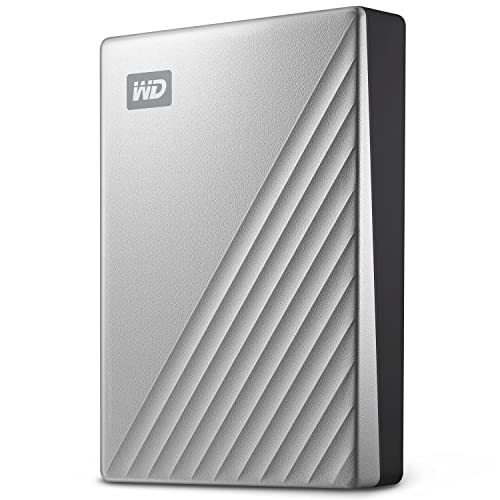
- 5TB portable storage capacity
- Formatted for Mac with USB-C support
- 256-bit AES hardware encryption
Best For: Mac backups and secure portable storage
Reliable Everyday Storage
Seagate 2TB Portable Hard Drive

- 2TB portable storage
- Works with Windows and Mac
- Plug-and-play USB 3.0 setup
Best For: Everyday backups and portable file storage
Flexible USB-C Expansion
YOTUO 1TB USB-C External Hard Drive

- USB 3.0 and USB-C connectivity
- Works across computers and listed consoles
- Built-in silicone protection
Best For: Cross-device storage and console game expansion
High-Capacity Secure Backup
WD 5TB My Passport Ultra USB-C Drive
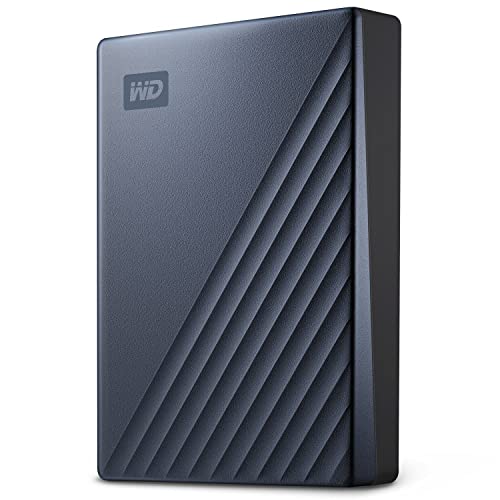
- Large 5TB storage capacity
- USB-C and USB 3.1 compatible
- 256-bit AES hardware encryption
Best For: Large, security-conscious backups and media libraries
Best Value Capacity
Seagate Portable 4TB External Hard Drive
- 4TB capacity for extensive file storage
- Plug-and-play USB 3.0 setup
- Compact 2.5-inch portable design
Best For: Straightforward personal or business backups
Best Security Features
WD My Passport 5TB Portable Drive

- 5TB portable storage capacity
- Password protection and hardware encryption
- Includes backup and management software
Best For: Protected personal, business, or gaming files
Best Balanced 4TB Option
WD My Passport 4TB Portable Drive
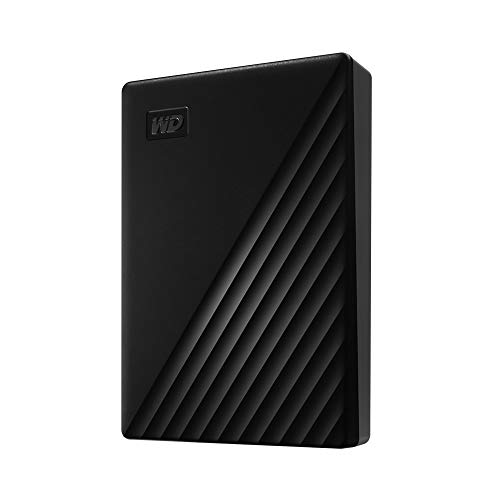
- Portable 4TB storage for everyday files
- Hardware encryption and password protection
- Includes backup management software
Best For: PC users wanting secure, portable backups
Best Rugged SSD – SanDisk 2TB Extreme Portable SSD
For shoppers comparing USB C external hard drives, the SanDisk Extreme Portable SSD is a strong choice when speed, compactness, and protection matter. It offers up to 1,050MB/s read speeds, 1,000MB/s write speeds, IP65 water and dust resistance, and up to 3-meter drop protection.
Best For: Fast file transfers, travel, gaming, and users who want a durable 2TB portable SSD.
Pros:
- Up to 1,050MB/s read and 1,000MB/s write speeds
- IP65 water and dust resistance with up to 3-meter drop protection
- 256-bit AES hardware encryption and password protection
- Compact design with a convenient carabiner loop
Cons:
- Provides less capacity than larger desktop hard drives at a higher-performance, SSD-oriented price point
- Actual speeds can vary by host device and other factors
This is a well-rounded USB-C storage option for people who prioritize responsive performance and rugged portability over maximum capacity.
Best High-Capacity Desktop Drive – Seagate 16TB One Touch Desktop Drive
The Seagate One Touch is a practical pick among USB C external hard drives when capacity is the priority. Its 16TB mechanical drive is designed to keep large collections of assignments, projects, multimedia, and other files in one place, while its bus-powered USB-C connection avoids the need for a wall outlet.
Best For: Desktop backups, large media libraries, business files, and users who need substantial storage capacity.
Pros:
- Large 16TB storage capacity
- Bus-powered USB-C operation with no wall outlet required
- 7,200rpm mechanical drive
- Includes two-year limited warranty and Rescue Data Recovery Services
Cons:
- Its 3.5-inch desktop form factor is less portable than compact drives
- Mechanical storage is slower and less shock-resistant than an SSD
- The connected device must provide 15W USB power
Choose this model when consolidating a large amount of data matters more than pocket-sized portability or SSD-level transfer performance.
Best Compact SSD – SanDisk 1TB Portable Drive
The SanDisk 1TB Portable Drive is a simple, pocket-sized option for shoppers seeking USB C external hard drives for everyday file transfers. Its solid-state design delivers read speeds up to 600MB/s, while the lack of moving parts helps support durability and up to 2-meter drop protection.
Best For: Portable work files, phone and laptop storage, AI content, and users who want a lightweight USB-C SSD.
Pros:
- Up to 600MB/s read speeds
- Pocket-sized design for small bags and everyday carry
- Up to 2-meter drop protection
- USB-C ready and compatible with Mac and PC platforms
Cons:
- 1TB capacity may be limiting for large media collections
- Slower than the SanDisk Extreme model in this roundup
- Supplied notes do not specify water or dust resistance
This drive makes sense for straightforward portable storage when you want SSD durability and USB-C convenience without moving up to a higher-capacity or faster model.
Best Mac Backup Drive – WD 5TB My Passport Ultra for Mac
The WD My Passport Ultra for Mac is a useful choice among USB C external hard drives for Mac users who want portable capacity and built-in security features. It provides 5TB of storage, a metal cover, USB-C and USB 3.1 compatibility, password protection, and 256-bit AES hardware encryption.
Best For: Mac backups, personal or business files, and users who prefer a larger portable mechanical drive with security features.
Pros:
- Generous 5TB portable storage capacity
- Formatted for Mac and compatible with USB-C and USB 3.1
- 256-bit AES hardware encryption with password protection
- Metal cover and included backup software with ransomware defense
Cons:
- Designed primarily for Mac use and formatted for Mac
- Mechanical storage is less durable against drops than an SSD
- Not as fast as the SSD options in this roundup
For Mac owners who need more capacity than a compact SSD provides, this drive combines portable storage with useful backup and protection features.
Reliable Everyday Storage – Seagate 2TB Portable Hard Drive
For shoppers comparing usb c external hard drives, the Seagate 2TB Portable Hard Drive is a straightforward option for expanding storage and backing up files. It uses USB 3.0, supports Windows and Mac computers, and offers plug-and-play setup with no additional software required.
Best For: Everyday file storage, computer backups, and users who want a simple portable drive with generous capacity.
Pros:
- Provides 2TB of portable storage.
- Works with Windows and Mac computers.
- Plug-and-play setup with the included USB 3.0 cable.
- Compact 190-gram design for on-the-go use.
Cons:
- Uses USB 3.0 rather than a native USB-C connection.
- Mechanical hard-drive design may be less convenient than an SSD for frequent travel.
The Seagate is a practical pick when capacity and simple computer backups matter more than USB-C convenience. Its included cable and automatic recognition make it easy to put into service.
Flexible USB-C Expansion – YOTUO 1TB USB-C External Hard Drive
The YOTUO 1TB External Hard Drive stands out among usb c external hard drives for its USB 3.0 and USB-C connectivity. It is designed for computers, smartphones, and consoles, while its built-in silicone sleeve adds protection for travel and everyday handling.
Best For: Gamers and multitaskers who need portable storage across computers, compatible consoles, and other devices.
Pros:
- Supports USB 3.0 and USB Type-C connectivity.
- Compatible with Windows, Mac, Linux, PS4, PS5, and Xbox platforms listed by the manufacturer.
- Lightweight 0.16-kilogram design with a built-in silicone sleeve.
- Offers up to 1TB of storage and plug-and-play operation.
Cons:
- PS5 and Xbox Series X/S games cannot be run or stored directly from the drive according to the supplied notes.
- Provides less capacity than the 2TB and 5TB alternatives in this roundup.
Choose the YOTUO when device flexibility and USB-C support are priorities. It is especially useful for moving files or storing older-generation console games, with the important next-generation gaming limitation in mind.
High-Capacity Secure Backup – WD 5TB My Passport Ultra USB-C Drive
For shoppers seeking usb c external hard drives with substantial capacity and added security, the WD 5TB My Passport Ultra combines USB-C and USB 3.1 compatibility with password protection and 256-bit AES hardware encryption. It is formatted for Windows and includes backup software with defense against ransomware.
Best For: Large personal or business backups, media collections, and users who value password-protected portable storage.
Pros:
- Offers a spacious 5TB capacity.
- Supports USB-C and USB 3.1 connectivity.
- Includes password protection with 256-bit AES hardware encryption.
- Comes with backup software featuring defense against ransomware and a three-year limited warranty.
Cons:
- It is formatted for Windows, so Mac users may need to account for formatting compatibility.
- The 2.5-inch mechanical design is thicker than some smaller portable drives.
The My Passport Ultra is the strongest capacity-focused choice here, particularly for buyers handling large backups or sensitive files. Its USB-C support and security features add convenience and protection beyond basic storage.
Best Value Capacity – Seagate Portable 4TB External Hard Drive
If you need generous capacity without complicated setup, this Seagate portable drive is a practical option among USB C external hard drives when paired with a compatible USB adapter or port. It offers 4TB of storage, USB 3.0 connectivity, plug-and-play recognition, and a compact 2.5-inch design for personal or business files.
Best For: Users who want straightforward 4TB storage for backups, media, documents, or compatible PlayStation 4 use.
Pros:
- Large 4TB capacity for files, photos, videos, and documents
- Plug-and-play setup with no software required
- Includes an 18-inch USB 3.0 cable
- Compact and lightweight portable design
Cons:
- Uses a mechanical hard disk rather than solid-state storage
- The included connection is USB 3.0, so a USB-C adapter or compatible cable may be needed
Choose this model if capacity and simple drag-and-drop backups matter more than advanced security features. Its 1-year limited warranty and portable build add practical value for everyday storage.
Best Security Features – WD My Passport 5TB Portable Drive
For shoppers comparing USB C external hard drives, the WD My Passport 5TB is worth considering when file protection is a priority. This portable mechanical drive includes password protection, hardware encryption, backup and device-management software, and compatibility with USB 3.0 and USB 3.1 connections.
Best For: Users who need high portable capacity with password protection and hardware encryption for personal, business, or gaming files.
Pros:
- 5TB capacity for photos, videos, documents, and other files
- Password protection and hardware encryption help secure stored data
- Included software supports device management and backup
- Three-year limited warranty
Cons:
- USB-A cable is included, so a USB-C adapter or replacement cable may be necessary
- Mechanical storage is less compact in performance terms than an SSD
This WD model stands out for combining substantial capacity with built-in security features. Its slim design and broad computer compatibility make it a strong choice for carrying protected backups, although USB-C users should confirm cable requirements.
Best Balanced 4TB Option – WD My Passport 4TB Portable Drive
The WD My Passport 4TB balances portable capacity with useful data-protection tools. It is a practical pick among USB C external hard drives for users who need a compact backup drive with password protection, hardware encryption, and compatibility with USB 3.0 and USB 3.2 Gen 2 connections.
Best For: PC users seeking portable 4TB storage with backup software and added file-security features.
Pros:
- 4TB capacity for multimedia, business, and personal files
- Password protection and hardware encryption are included
- Backup and device-management software is supplied
- Three-year manufacturer’s limited warranty
Cons:
- Includes a USB-A cable rather than a native USB-C cable
- Mechanical hard-disk storage may not offer SSD-level performance
This is a sensible middle ground for buyers who want more than basic storage but do not need the larger 5TB capacity. Its slim enclosure, security features, and included software make it well suited to routine PC backups and portable file storage.
How We Picked the Best USB C External Hard Drives
We compared these drives by storage capacity, connection type, portability, performance claims, compatibility, durability, and backup or security features. The list includes both SSD and HDD models because they serve different priorities: SSDs are generally faster and more resistant to movement, while HDDs provide more capacity for less money.
We also considered practical details such as whether a drive is bus-powered, intended for desktop use, supplied with USB-C connectivity, or designed primarily for Windows, Mac, gaming, or general file storage. Before buying, verify the included cable and your device’s port and formatting requirements.
Quick Comparison
| Best For | Recommended Type | Typical Capacity | Main Advantage |
|---|---|---|---|
| Fast transfers and travel | Portable SSD | 1TB–2TB | High speed, compact design, better shock resistance |
| Everyday backups | Portable HDD | 2TB–5TB | Affordable capacity |
| Large media libraries | Desktop HDD | 16TB | Maximum storage per drive |
| Mac-focused storage | Mac-compatible portable drive | 4TB–5TB | Convenient backup and security features |
Key Buying Factors for USB-C External Hard Drives
SSD Versus HDD
Choose an SSD if you regularly move large video files, edit media directly from the drive, or carry it between locations. Select an HDD when capacity and price matter more than peak transfer speed. A desktop HDD can be excellent for a stationary backup library but usually requires its own power adapter.
Capacity and Backup Headroom
Estimate your current data, then leave room for growth and versioned backups. A 1TB drive suits documents and smaller media collections; 4TB or 5TB models are more flexible for photos, video, and game libraries. A 16TB desktop drive is better for extensive archives and centralized backups.
Speed, Ports, and Compatibility
USB-C describes the connector, not necessarily the transfer standard. Check whether the drive uses USB 3.0, USB 3.2 Gen 2, or another specification, and remember that your computer must support the faster standard to achieve higher speeds. Confirm compatibility with Windows, macOS, consoles, and phones before purchase; reformatting may be required.
Durability and Security
For frequent travel, look for compact construction and resistance to drops, dust, or water. Backup software, password protection, and ransomware defenses can add useful safeguards, but they do not replace a second backup in another location.
Who Should Buy Which USB C External Hard Drives?
- Choose a portable SSD for photographers, video editors, students, and travelers who value speed, quiet operation, and durability.
- Choose a 2TB–5TB portable HDD for affordable everyday backups, documents, photos, and expanding a laptop or console library.
- Choose a Mac-focused WD model if you want a portable backup drive with software and security features tailored to Mac workflows.
- Choose a high-capacity desktop drive for large media archives, home-server-style storage, and backup collections that stay in one place.
- Choose a multi-device USB-C option if you need flexible connectivity across a PC, Mac, laptop, smartphone, or gaming console, while checking each device’s formatting and power limits.