
A Dolby Atmos logo on a streaming box is a starting point, not a guarantee of immersive sound. Your streaming service, subscription, chosen title, TV, and soundbar or receiver all need to support the right audio path.
These 10 picks span Roku, Fire TV, Google TV, and Android TV options. Use the guide below to narrow down the platform and connections that fit your setup before choosing a device.
Best 10 Streaming Devices with Dolby Atmos Picks for 2026
Best for Wired Home Theaters
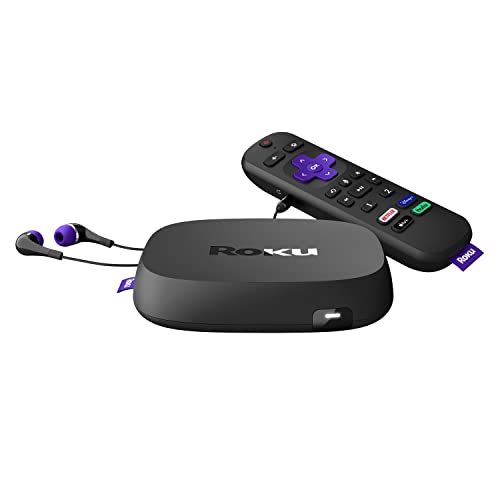
- 4K, Dolby Vision, and Atmos
- Wi-Fi or Ethernet connection
- Lost-remote finder and HDMI cable
Best For: Wired home theaters with simple remote control
Best for Hands-Free Control
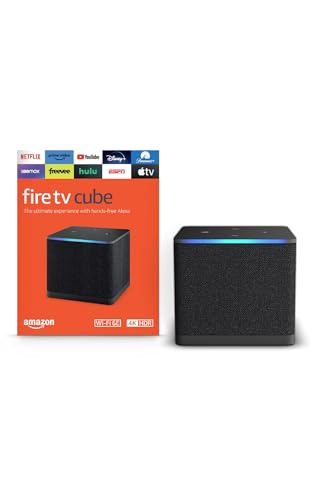
- 4K, Dolby Vision, and Atmos
- Hands-free Alexa controls
- Wi-Fi 6E connectivity
Best For: Alexa-centered home theaters
Best for Google TV Apps

- 4K/60 fps and Dolby Vision
- Google TV with 32GB storage
- Confirm Atmos support before buying
Best For: Google TV users seeking a compact 4K box
Best Roku Remote

- Dolby Atmos, Vision, and HDR10+
- Backlit rechargeable voice remote
- Wi-Fi 6 or Ethernet
Best For: Roku fans prioritizing remote convenience
Best for Unified Browsing
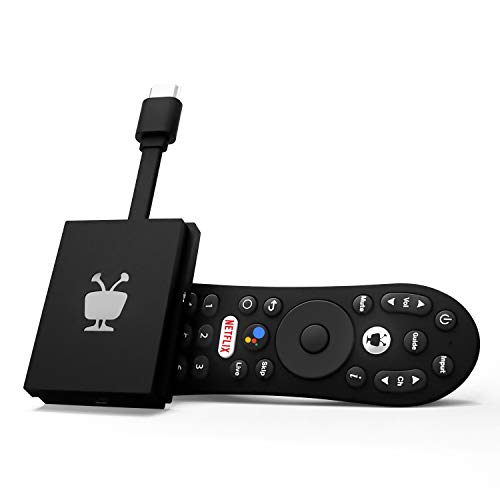
- Cross-app search and watchlists
- Dolby Vision and Dolby Atmos
- Google Assistant voice control
Best For: Viewers who want one place to browse multiple apps
Best for Google TV Homes

- Personalized Google TV home screen
- Dolby Vision; connects to Atmos speakers
- Ethernet and 32 GB storage
Best For: Households seeking personalized recommendations and live channels
Best for Expanded Storage

- 128 GB storage and 4 GB RAM
- Dolby Vision and Dolby Atmos
- Gigabit LAN and Wi-Fi 6E
Best For: Viewers wanting storage and customizable controls
Best for Flexible Connectivity

- Dolby Vision and Atmos support
- Wi-Fi 6 and Ethernet port
- 3GB RAM and 32GB storage
Best For: Google TV users who want wired networking and room for apps
Best Heavy-Duty Pick
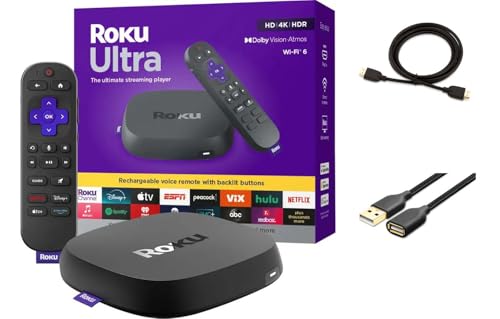
- Dolby Vision, HDR10+, and Atmos
- Rechargeable, backlit voice remote
- Wi-Fi 6 and HDMI cable included
Best For: Roku users who value easy navigation and a feature-rich remote
Best for Dual Audio Formats

- Dolby Atmos and DTS:X support
- Dolby Vision and HDR10+ support
- Google TV, Cast, and 32GB storage
Best For: Google TV viewers seeking both Dolby Atmos and DTS:X support
Best for Wired Home Theaters – Roku Ultra 4800R
Among streaming devices with Dolby Atmos, this Roku Ultra is a practical pick for a home theater that benefits from Ethernet. It pairs 4K and Dolby Vision video with Atmos audio, while its remote includes TV power and volume controls.
Best For: Viewers who want Dolby Atmos streaming, a wired network option, and a remote that can control their TV.
Pros:
- Supports 4K, Dolby Vision, and Dolby Atmos.
- Offers Wi-Fi or Ethernet connectivity.
- Lost-remote finder plays a sound from the remote.
- Includes a premium HDMI cable.
Cons:
- Dolby Atmos playback depends on compatible content and audio equipment.
- Does not list Wi-Fi 6 support.
Choose this model if reliable wired streaming and straightforward TV controls matter more to you than newer Wi-Fi features.
Best for Hands-Free Control – Amazon Fire TV Cube
If voice control tops your list of streaming devices with Dolby Atmos, the Fire TV Cube stands out. Its built-in microphones and speakers let you use Alexa hands-free, while 4K, Dolby Vision, and Atmos support cover the home-theater essentials.
Best For: Alexa users who want hands-free streaming controls and Wi-Fi 6E connectivity.
Pros:
- Supports 4K, Dolby Vision, HDR, and Dolby Atmos.
- Built-in microphones enable hands-free Alexa control.
- Wi-Fi 6E support and an octa-core processor.
- Can switch between compatible connected entertainment devices.
Cons:
- Hands-free features depend on using Alexa and compatible equipment.
- Some streaming services require subscriptions.
The Cube makes the most sense when you will use its voice and device-control features, not just its Atmos playback.
Best for Google TV Apps – Xiaomi TV Box S 3rd Gen
The Xiaomi TV Box S 3rd Gen is a compact Google TV option to consider among streaming devices with Dolby Atmos. Its title lists Atmos support, though the supplied feature bullets describe Dolby Audio and DTS:X rather than explicitly confirming Atmos playback; verify that detail before buying specifically for Atmos.
Best For: Google TV users who want 32GB of storage and a compact 4K streaming box.
Pros:
- Supports 4K at 60 fps, Dolby Vision, and HDR10+.
- Google TV offers app access, recommendations, and Google Assistant voice control.
- Includes 32GB of storage, Google Cast, and an HDMI cable.
Cons:
- Atmos is listed in the title but not explicitly confirmed in the supplied feature bullets.
- Warranty information must be obtained from the seller or manufacturer.
It is appealing for the Google TV interface and storage, but confirm its Atmos capabilities with the seller if immersive audio is your deciding factor.
Best Roku Remote – Roku Ultra 2024
For shoppers comparing streaming devices with Dolby Atmos, the Roku Ultra 2024 combines Atmos audio with 4K, HDR10+, and Dolby Vision video. Its rechargeable Voice Remote Pro adds backlit buttons, hands-free controls, and a lost-remote finder.
Best For: Roku viewers who want a feature-rich remote and a choice of Wi-Fi 6 or Ethernet.
Pros:
- Supports Dolby Atmos, Dolby Vision, and HDR10+.
- Backlit, rechargeable remote supports hands-free voice control.
- Offers Wi-Fi 6 and Ethernet connectivity.
- Bluetooth Headphone Mode supports private listening.
Cons:
- Dolby Atmos requires compatible content and audio equipment.
- Voice control is tied to Roku’s supported commands and services.
This is the stronger Roku choice here if remote convenience and Wi-Fi 6 are priorities alongside home-theater formats.
Best for Unified Browsing – TiVo Stream 4K
Among streaming devices with Dolby Atmos, the TiVo Stream 4K is a practical pick if you want to browse shows across apps from one screen. It pairs 4K playback and Dolby Vision with an Android TV interface and Google Assistant voice control.
Best For: Viewers who want cross-app recommendations and watchlists without switching between app home screens.
Pros:
- Centralized search, browsing, and watchlists across apps.
- Dolby Atmos and Dolby Vision support.
- Google Assistant can search for shows and launch apps.
Cons:
- 8 GB of storage leaves less room for apps than the other models here.
- Listed manufacturer warranty is 90 days.
The strongest reason to choose this compact HDMI device is its show-first interface; check that your preferred services fit your setup before buying.
Best for Google TV Homes – Google TV Streamer 4K
The Google TV Streamer 4K stands out among streaming devices with Dolby Atmos for its personalized home screen, voice remote, and smart-home control. It offers up to 4K HDR with Dolby Vision and can connect to speakers that support Dolby Atmos.
Best For: Households that want tailored recommendations, live-channel browsing, and Google TV controls in one box.
Pros:
- Shows from multiple services appear on the home screen alongside personalized recommendations.
- Ethernet and Wi-Fi connectivity, plus 32 GB of storage.
- Access to more than 800 free live channels is advertised.
Cons:
- An HDMI 2.1 cable is required and sold separately.
- Dolby Atmos listening requires compatible speakers.
This is a good fit if the Google TV interface matters as much as picture and sound support; budget for the cable and any audio gear your setup needs.
Best for Expanded Storage – Formuler Z12 Ultra
For buyers comparing streaming devices with Dolby Atmos, the Formuler Z12 Ultra offers a notably roomy 128 GB of storage alongside Dolby Vision, HDR10+, and 4K playback. Its Android 12 platform and customizable home screen favor people who want more control over their media box.
Best For: Viewers who want substantial local storage, flexible connectivity, and a customizable streaming interface.
Pros:
- 128 GB storage and 4 GB RAM provide room for apps and recordings.
- Gigabit LAN and Wi-Fi 6E offer wired and wireless connection options.
- Backlit Bluetooth voice remote has programmable hotkeys and Find My Remote support.
- Supports Dolby Atmos, Dolby Vision, and 4K 60 fps 10-bit playback.
Cons:
- Larger TV-box design is less discreet than a compact plug-in streamer.
- The supplied warranty information describes a return policy rather than a specific manufacturer warranty term.
Choose this model for storage, connectivity, and remote features rather than the smallest possible device; confirm that your must-have apps and services suit your setup.
Best for Flexible Connectivity – onn 4K Pro Google TV
Among streaming devices with Dolby Atmos, the onn 4K Pro is a practical Google TV option if you want both Wi-Fi 6 and an Ethernet port. It pairs 4K UHD and Dolby Vision with 3GB of RAM and 32GB of storage.
Best For: Google TV users who want wired networking and room for apps.
Pros:
- Supports Dolby Vision video and Dolby Atmos audio.
- Offers Wi-Fi 6 plus an Ethernet port.
- Includes 3GB of RAM, 32GB of storage, and a backlit find-my-remote feature.
Cons:
- Its 1.5-pound listed weight makes it less compact than the lighter boxes in this roundup.
Choose this one if connectivity and Google TV features matter as much as its Atmos support. Dolby formats require compatible content and equipment.
Best Heavy-Duty Pick – Roku Ultra
If you prefer Roku, the Roku Ultra stands out among streaming devices with Dolby Atmos for its rechargeable Voice Remote Pro. It supports 4K, HDR10+, and Dolby Vision, with Wi-Fi 6 for wireless connectivity.
Best For: Roku users who value easy navigation and a feature-rich remote.
Pros:
- Supports Dolby Atmos alongside Dolby Vision and HDR10+.
- Remote has backlit buttons, hands-free voice control, and a lost-remote finder.
- Includes a high-speed HDMI cable and USB-C charging cable.
Cons:
- The supplied specifications list Wi-Fi 6 and HDMI but do not identify an Ethernet port.
This is the strongest fit here for someone already comfortable with Roku’s interface. To hear Atmos, pair it with compatible content and audio equipment.
Best for Dual Audio Formats – Xiaomi TV Box S (3rd Gen)
The Xiaomi TV Box S (3rd Gen) is worth considering among streaming devices with Dolby Atmos if DTS:X support also matters to you. This compact Google TV box supports 4K UHD, Dolby Vision, HDR10+, and Wi-Fi 6.
Best For: Google TV viewers seeking both Dolby Atmos and DTS:X support.
Pros:
- Supports Dolby Atmos and DTS:X audio formats.
- Offers Dolby Vision and HDR10+ for compatible 4K content.
- Includes 32GB of storage, Google Cast, and a voice-enabled Bluetooth remote.
Cons:
- Its 2GB of RAM is less than the onn 4K Pro’s listed 3GB.
- Wi-Fi 6 benefits require a Wi-Fi 6-enabled router.
Pick the Xiaomi if audio-format flexibility and a small box are priorities. Check that your preferred apps, content, and audio setup support the formats you plan to use.
How We Picked the Best Streaming Devices with Dolby Atmos
We focused on streaming devices listed with Dolby Atmos support, then considered the differences that matter in everyday use: operating system, 4K and HDR support, network options, remote features, storage, and how easily each device fits into a home-theater setup. The list includes multiple Roku Ultra and Xiaomi TV Box S listings; check the exact generation and included remote before treating similar names as interchangeable.
Product specifications alone cannot confirm Atmos playback in every app. App support, subscription tier, title availability, software updates, and your TV or audio equipment can all affect the result.
Quick Comparison of Streaming Devices with Dolby Atmos
For a straightforward TV interface: compare the Roku Ultra listings, paying close attention to the remote and connectivity in each package. For hands-free control: the Fire TV Cube is the Alexa-focused choice. For Google TV: look at the Xiaomi TV Box S 3rd Gen, Google Streamer 4K, and onn 4K Pro listings, then compare their ports, storage, and network features. For an Android TV alternative: TiVo Stream 4K offers an app-and-live-TV approach, while the Formuler Z12 Ultra emphasizes hardware specifications and wired networking.
Key Buying Factors for Streaming Devices with Dolby Atmos
Confirm the Complete Audio Chain
Atmos requires an Atmos-capable title and app, a plan that includes the format where applicable, and compatible playback hardware. If the streamer connects to your TV first, check whether the TV can pass Atmos to your soundbar or receiver through its HDMI ARC or eARC connection. A direct connection to a compatible receiver may be simpler for some systems. Check the supported audio formats on every device in the chain rather than assuming an Atmos badge settles compatibility.
Choose a Platform You Will Enjoy Using
Roku, Fire TV, Google TV, and Android TV organize search, recommendations, and live content differently. Before buying, confirm that your essential streaming and local-TV apps are available on the device in your region. Voice controls may also depend on the platform and account setup.
Check Picture, Network, and Practical Features
Match the streamer’s HDR formats, such as Dolby Vision or HDR10+, to your TV and the content you watch. Wi-Fi 6 or 6E may help in a suitable home network, while Ethernet can provide a dependable option where available. Also compare remote controls, headphone-listening options, storage, and HDMI requirements; these conveniences can matter more day to day than small specification differences.
Who Should Buy Which Streaming Devices with Dolby Atmos?
Choose a Roku Ultra if you want a familiar, simple streaming interface; verify which Ultra version and remote the listing includes. Consider the Fire TV Cube if hands-free Alexa control is a priority. Pick a Google TV option if you prefer its app discovery and voice-search approach, comparing the Xiaomi, Google, and onn devices on the features you need. Consider TiVo if its combined content interface appeals to you, or Formuler if wired networking and expanded storage are higher priorities. Whichever you choose, confirm your sound system’s Atmos connection path before checkout.