
A good microphone arm should do more than lift your mic off the desk. The best models make positioning easier, keep cables contained, and remain stable when you move the microphone during a stream, podcast, or recording session.
This roundup compares 10 microphone boom arms with cable management, from compact low-profile stands to heavy-duty arms designed for larger microphones. Use the guide below to match clamp strength, reach, rotation, and cable routing to your setup.
Best 10 Microphone Boom Arm with Cable Management Picks for 2026
Best All-Around Cable Management

- Covered cable channels keep wires concealed
- 32.3-inch horizontal reach with riser
- Supports microphones up to 3.5 pounds
Best For: Clean, flexible streaming and recording setups
Best for Quiet Operation

- Spring damping helps reduce creaks and handling noise
- Integrated routing conceals XLR cables
- Supports microphones from 0.25 to 1.2 kg
Best For: Quiet podcasting and broadcast setups
Best for Versatile Compatibility

- Supports up to 4.4 pounds
- Fits 1/4-inch, 3/8-inch, and 5/8-inch mounts
- Includes phone clip, cable ties, and adapters
Best For: Multi-microphone streaming and home-office setups
Best Heavy-Duty Low-Profile Arm
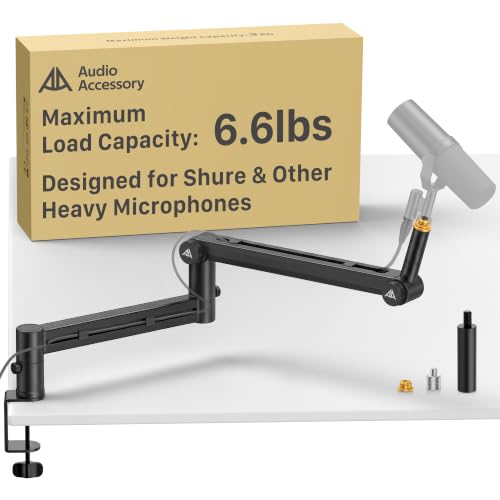
- Handles microphones up to 6.6 pounds
- Gear-lock design helps prevent sagging
- Deep channels route multiple cables
Best For: Heavy studio microphones and stable low-profile setups
Best Low-Profile Pick

- Low-profile, 29-inch metal arm
- Built-in cable channels
- Supports up to 1.5 kg
Best For: Screen-clear podcasting and streaming setups
Best Hidden Cable Setup

- Hidden cable organizer
- Aluminum build supports 800 g
- 360-degree rotating base
Best For: Neat, compact streaming and podcast desks
Best for Lightweight Mics

- Compact fold-away design
- 29-inch reach with cable channels
- 3/8- and 5/8-inch threads
Best For: Light microphones on space-limited desks
Heavy-Duty Cable Control

- Supports up to 4.4 pounds
- Hidden springs and removable cable covers
- Wide 135° horizontal and 180° vertical adjustment
Best For: Heavier microphones such as Blue Yeti and Shure SM7B
Compact Desk Stability

- Supports up to 1.4 kg
- Hidden cable routing for USB cables
- Padded clamp fits desks up to 2.6 inches thick
Best For: Compact Blue Yeti and USB microphone desk setups
Flexible All-in-One Setup

- Supports up to 3.3 pounds
- Concealed cable channel and 360° rotation
- Includes a detachable adjustable phone holder
Best For: Streaming and recording setups that use a phone alongside the microphone
Best All-Around Cable Management – InnoGear White Mic Arm
If you want a microphone boom arm with cable management for a tidy streaming or recording desk, this InnoGear model combines covered cable channels with broad positioning flexibility. Its extension riser, long reach, and 3.5-pound capacity make it suitable for many popular USB and studio microphones.
Best For: Streamers and podcasters who want a clean white arm with strong reach and compatibility for microphones such as the Blue Yeti, AT2020, and SM7B.
Pros:
- Built-in channels and removable rubber covers help conceal and organize cables.
- Reaches up to 32.3 inches horizontally and 37.4 inches vertically with the included riser.
- Supports up to 3.5 pounds and offers 360-degree base rotation.
- Compatible with many microphones through its 5/8-inch connector.
Cons:
- The desk clamp fits desks up to 2 inches thick.
- A shock mount is not included.
Choose this arm when neat cable routing, a light-colored finish, and generous height adjustment matter as much as microphone support. The 12-month warranty adds useful coverage for a desk-mounted setup.
Best for Quiet Operation – RØDE PSA1+ Boom Arm
The RØDE PSA1+ is a microphone boom arm with cable management designed for recording environments where smooth, quiet repositioning is important. Its internal spring damping reduces creaks and handling noise, while the integrated routing keeps the XLR cable hidden.
Best For: Professional podcasting, broadcasting, and streaming setups using microphones and shock mounts between 0.25 and 1.2 kilograms.
Pros:
- Internal spring damping supports quiet adjustments during recording.
- Integrated cable management helps maintain a clean desk appearance.
- 360-degree rotation and full extension provide flexible positioning.
- Includes thread adaptors for 3/8-inch and 5/8-inch microphone mounts.
Cons:
- Its supported microphone range tops out at 1.2 kilograms.
- The clamp fits desks up to 70 millimeters thick.
The PSA1+ is a strong choice when low operating noise and a polished broadcast-style setup are priorities. Its two-year warranty is also longer than many basic boom-arm options.
Best for Versatile Compatibility – 360° Rotatable Mic Arm
This microphone boom arm with cable management is built for flexible home-office, gaming, and recording setups. Its 360-degree base, multiple thread adapters, included phone clip, and cable ties make it a versatile option when you use different microphones or accessories.
Best For: Streamers, gamers, and creators who need broad compatibility and a sturdy arm that supports microphones up to 4.4 pounds.
Pros:
- Supports up to 4.4 pounds and helps reduce slight microphone vibration.
- Built-in cable management keeps wires organized and helps prevent accidental pulls.
- Includes 1/4-inch, 3/8-inch, and 5/8-inch thread compatibility.
- Package includes a phone clip, microphone clip, cable ties, and rotatable ball head.
Cons:
- The clamp is designed for desktops from 0.8 to 2.4 inches thick.
- The included accessories may be more than needed for a simple microphone-only setup.
Consider this model if you want one arm to accommodate several microphone standards and desk accessories. Its 4.4-pound capacity and 360-degree rotation offer useful flexibility without requiring separate adapters.
Best Heavy-Duty Low-Profile Arm – AA Audio Accessory Mic Arm
For a heavy microphone boom arm with cable management, this AA Audio Accessory model uses reinforced arms and a gear-lock mechanism rather than spring loading. Its deep cable channels, low-profile design, and 6.6-pound capacity target demanding setups with microphones such as the Shure SM7B, MV7, and RØDE PodMic.
Best For: Users with heavier studio microphones who want a stable, low-profile arm that resists sagging over time.
Pros:
- Supports up to 6.6 pounds with 40 × 25-millimeter reinforced arms.
- Gear-lock design is intended to prevent sagging over time.
- Deep channels route multiple cables neatly.
- Offers 360-degree horizontal and 120-degree vertical adjustment with tool-free knobs.
Cons:
- At 1.63 kilograms, it is heavier than many basic boom arms.
- The listed warranty is one year.
This is the most suitable option in the group for a heavy microphone and a stability-focused desk setup. Its extra-long 780-millimeter reach and included adapters add flexibility, while the low-profile structure keeps the arm visually unobtrusive.
Best Low-Profile Pick – FIFINE BM88W
The FIFINE BM88W is a practical microphone boom arm with cable management for creators who want a cleaner desk and an unobstructed screen view. Its metal construction, low-profile design, 29-inch reach, and broad adjustment range suit podcasting, streaming, and home studio setups.
Best For: Low-profile recording and streaming setups using microphones up to 1.5 kg.
Pros:
- Low-profile arm extends from below the screen to preserve workspace visibility.
- Metal construction supports microphones up to 1.5 kg and helps reduce vibration.
- Built-in cable channels keep the recording area organized.
- 360-degree horizontal and 220-degree vertical adjustment provide flexible positioning.
Cons:
- The desk clamp fits desktops from 0.8 to 2.4 inches thick.
- The section nearest the C-clamp cannot be adjusted vertically.
- The microphone is not included.
Choose the BM88W if screen clearance and weight capacity matter most. Its included adapters support 1/4-, 3/8-, and 5/8-inch mounting options, though buyers should verify their desk thickness and microphone setup before ordering.
Best Hidden Cable Setup – FULAIM X37
The FULAIM X37 is a microphone boom arm with cable management designed for a tidy, professional desktop. Its aluminum-alloy build supports microphones up to 800 g, while the hidden cable organizer, rotating base, and fold-away design make it well suited to compact streaming and recording stations.
Best For: Streamers and podcasters who prioritize concealed cable routing and flexible positioning.
Pros:
- All-metal aluminum-alloy structure supports microphones up to 800 g.
- Hidden cable management keeps cords tucked away and helps prevent accidental pulls.
- 360-degree base rotation, 180-degree arm movement, and a 270-degree adapter offer flexible positioning.
- Includes 3/8- and 5/8-inch compatibility, cable ties, and a high-strength desk clamp.
Cons:
- The 800 g weight recommendation limits suitability for heavier studio microphones.
- The microphone is not included.
The X37 stands out when appearance and cable control are central to your setup. Its two clamp-use modes and fold-away arm can also help conserve desk space, while the included adapters cover many common microphones.
Best for Lightweight Mics – TODI TDMS02BKUS
The TODI TDMS02BKUS is a compact microphone boom arm with cable management for lightweight microphones. Its slim, fold-away design extends up to 29 inches, rotates at the base, and can sit behind a monitor to keep a gaming, podcasting, or streaming desk clear.
Best For: Lightweight microphones and space-conscious desktop setups.
Pros:
- Integrated metal-alloy construction and strengthened screws provide a stable design for light microphones.
- Low- and high-profile positioning options help preserve screen visibility.
- Fold-away form and 29-inch extension make it suitable for larger desks and storage.
- Cable channels help organize cords and reduce excessive pulling.
Cons:
- It is intended for lightweight microphones and is not designed for heavy-duty studio mics.
- It does not fit certain 1/4-inch microphones, including the Blue Yeti ORB, Yeti X, Shure MV7i, and Shure Beta58A.
- The microphone is not included.
The TODI is a sensible choice for buyers who want a small, storable arm rather than a heavy-duty studio mount. Confirm your microphone’s thread and weight before purchase, especially if using a model outside the listed 3/8- and 5/8-inch standards.
Heavy-Duty Cable Control – InnoGear PSA28-RD Boom Arm
If you need a microphone boom arm with cable management for a heavier recording microphone, the InnoGear PSA28-RD combines concealed cable organization with a reinforced steel construction. Its removable rubber cable covers make routing and tidying cables straightforward, while the broad adjustment range helps you position the mic precisely.
Best For: Blue Yeti, Shure SM7B, and other heavier microphones used for recording, streaming, or podcasting.
Pros:
- Supports microphones up to 4.4 pounds with a reinforced steel arm tube.
- Hidden springs and cable channels create a cleaner, more professional setup.
- Offers 135° horizontal and 180° vertical adjustment, with reach up to 32.3 inches horizontally and 30.9 inches vertically.
- Uses a 5/8-inch metal connector compatible with a wide range of listed microphones.
Cons:
- Shock mount is not included.
- Its 2 kg construction may be more substantial than needed for lightweight microphones.
The PSA28-RD is a strong choice when load capacity and discreet cable routing matter most. Its wide positioning range also makes it useful for setups that need the microphone moved out of the way between sessions.
Compact Desk Stability – Upgraded Blue Yeti Boom Arm
This microphone boom arm with cable management is designed for a stable, relatively compact desk setup. Its all-tube metal construction supports up to 1.4 kg, while the hidden cable routing keeps a USB microphone cable tucked away. Three pivoting joints and a rotating base provide flexibility for finding a comfortable recording position.
Best For: Blue Yeti and similar microphones on desks where clamp stability and tidy USB cable routing are priorities.
Pros:
- All-tube metal construction supports up to 1.4 kg.
- Hidden cable management keeps the microphone USB cable neatly routed.
- Three pivoting joints and 360° base rotation allow flexible positioning.
- Metal clamp accommodates desks up to 2.6 inches thick and includes protective padding.
Cons:
- Its listed 15-inch arm size offers less reach than longer boom arms.
- Includes a 90-day warranty description.
The NBA6B suits users who want a straightforward, sturdy arm without a large reach. The padded clamp and included 3/8-inch-to-5/8-inch adapter make it practical for common USB and broadcast-style microphones.
Flexible All-in-One Setup – VEVOR AK-V6 Boom Arm
The VEVOR AK-V6 is a microphone boom arm with cable management for users who want flexible positioning and a tidy desk. Its concealed cable channel protects and organizes cables, while 360° rotation and a detachable phone holder add convenience for streaming, podcasting, gaming, and recording.
Best For: Streamers and creators who want a rotatable arm with concealed cable routing and a phone holder.
Pros:
- Internal suspension spring supports up to 3.3 pounds or 1.5 kg.
- 360° rotation and ABS connectors enable quiet, flexible adjustments.
- Concealed cable channel helps reduce loose cables and protects them from friction.
- Includes a detachable, 360° adjustable mobile phone clip.
Cons:
- Supports less weight than the InnoGear arm in this roundup.
- No warranty is specified in the supplied details.
- The included phone holder may be unnecessary for users who only need a microphone arm.
The AK-V6 stands out as a versatile option for content creators who value phone access as well as microphone positioning. Its 3/8-inch-to-5/8-inch adapter broadens compatibility with microphones and shock mounts.
How We Picked the Best Microphone Boom Arm with Cable Management
We focused on practical features that affect daily use: weight capacity, clamp stability, arm reach, adjustment range, rotation, cable-routing design, microphone compatibility, and desk-space requirements. The selection includes models for Blue Yeti-style microphones, heavier studio microphones, lightweight setups, streaming desks, podcast stations, and compact home offices.
We also considered whether an arm is easy to install and reposition. Spring damping, locking joints, hidden channels, and low-profile construction can make a noticeable difference when you adjust the microphone frequently.
Quick Comparison
- Best for Blue Yeti users: InnoGear and Blue Yeti-compatible arms offer convenient fit and desk mounting.
- Best for premium studio use: The RØDE PSA1+ emphasizes smooth movement and spring damping.
- Best for heavy microphones: AA AUDIO ACCESSORY and VEVOR models prioritize load support and firm clamps.
- Best low-profile choices: FIFINE BM88W and FULAIM X37 help preserve desk space.
- Best for lightweight microphones: TODI is designed for smaller, lighter microphone setups.
Key Buying Factors for a Microphone Boom Arm with Cable Management
Weight Capacity and Stability
Check the arm’s stated load rating against the combined weight of your microphone, shock mount, pop filter, and any adapters. A model rated for heavier equipment is less likely to sag, but correct clamp installation matters just as much. Desks with thin tops, beveled edges, or fragile surfaces may need extra care or a reinforcing pad.
Reach, Rotation, and Adjustment
Measure the distance from your preferred mounting point to your mouth or recording position. A longer arm provides flexibility, while a low-profile arm may be easier to keep out of the way. Look for 360-degree rotation or multiple locking joints if you regularly switch between speaking, gaming, and recording positions.
Cable Routing and Compatibility
Compare exposed clips with enclosed or hidden cable channels. Internal routing looks cleaner, while removable clips may be faster to install or replace. Confirm the microphone’s thread size and included adapters—3/8-inch and 5/8-inch connections are common, but mounts and shock mounts are not universally interchangeable.
Desk Clamp and Clearance
Verify that the clamp opens wide enough for your desk and has sufficient surface contact. A strong metal clamp can reduce vibration and movement, but it may not fit every desktop. Also account for monitor stands, shelves, wall clearance, and the arm’s folded footprint.
Who Should Buy Which Microphone Boom Arm with Cable Management?
Choose a Blue Yeti-compatible arm if you want a straightforward upgrade for that microphone family. Choose the RØDE PSA1+ if smooth, quiet positioning is more important than the lowest price. Choose a heavy-duty model if your setup includes a large condenser microphone, shock mount, and pop filter. Choose a low-profile arm for a compact desk or a monitor-heavy workspace. Choose a lightweight option if portability and easy storage matter more than maximum capacity.
Before ordering, confirm the microphone weight, thread connection, desk thickness, and available reach. Those four checks will usually matter more than appearance alone.