
The right screen can make office presentations sharper, easier to read, and more professional. Size, aspect ratio, portability, and setup style all affect how well a projector performs in a conference room or shared workspace.
We’ve selected 10 projector screens for office projectors covering compact tripod models, portable screens, pull-down designs, and larger options for training sessions or auditorium-style presentations.
Best 10 Projector Screens for Office Projectors Picks for 2026
Best Wall-Mounted Pick
Elite Screens Manual B 100-Inch

- 100-inch 16:9 screen with 4K/8K-ready material
- 180° viewing angle and 1.1 gain
- Manual auto-lock height adjustment
Best For: Permanent office presentation rooms
Best Large Tripod Presentation Screen
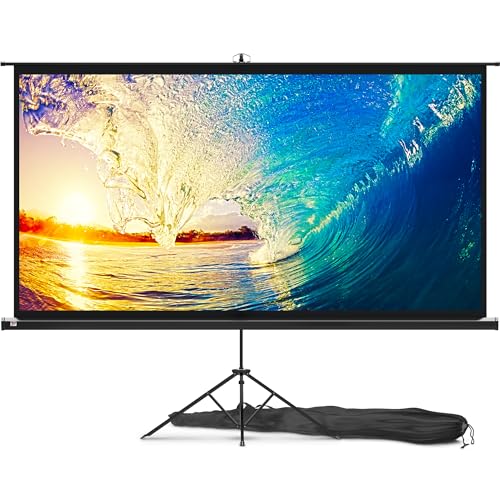
- Large 100-inch 16:9 presentation surface
- Adjustable tripod with wide support legs
- 1.1 gain matte finish and 160° viewing angle
Best For: Large mobile office meetings and conferences
Best Portable Tripod

- Lightweight retractable tripod design
- 4:3 format for presentations
- Matte fabric with black border
Best For: Compact, mobile office presentations
Best Large Foldable Screen
Mdbebbron 150-Inch Projection Screen
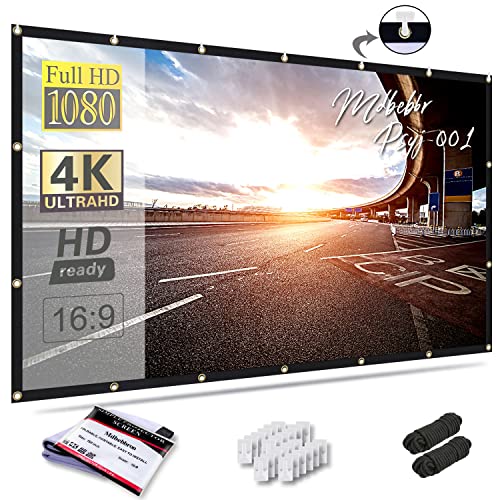
- Large 16:9 viewing area
- Foldable, portable polyester fabric
- Front and rear projection support
Best For: Large conference rooms and public displays
Best Freestanding 4K Option
VISULAPEX 80-Inch Projector Screen

- Portable 16:9 tripod setup
- 1.2-gain fiberglass surface
- 160-degree viewing angle
Best For: Portable office, event, and outdoor presentations
Best Stable Large-Screen Option
120-Inch Stake-Down Projector Screen

- Large 16:9 screen for group viewing
- Front and rear projection support
- Stake-down base and steel frame for stability
Best For: Large offices, schools, and mobile events
Best Extra-Large Presentation Screen

- 150-inch display for large audiences
- Supports front and rear projection
- Tool-free foldable stand and carry bag
Best For: Large conference rooms and office events
Best Wall-Mounted Pick – Elite Screens Manual B 100-Inch
For offices that need a permanent presentation surface, the Elite Screens Manual B is a practical choice among projector screens for office projectors. Its 100-inch, 16:9 format and manual pull-down design suit presentations, training sessions, and shared meeting rooms.
Best For: Permanent wall- or ceiling-mounted office installations.
Pros:
- 100-inch 16:9 viewing area with 49-by-87.2-inch view size.
- MaxWhite 2 material supports 4K, 8K, HDR, and active 3D front projection.
- 180-degree viewing angle and 1.1 gain support broad-room visibility.
- Auto-lock mechanism offers height adjustment, with a two-year parts-and-labor warranty.
Cons:
- Manual pull-down operation is less convenient than a motorized screen.
- Wall or ceiling installation is less portable than a tripod design.
Choose this model when consistent placement and a large, polished presentation surface matter more than portability. Its certified screen material and adjustable pull-down mechanism make it well suited to a dedicated office room.
Best Compact Tripod Option – PropVue 84-Inch
The PropVue 84-inch screen is a flexible option for offices that move between classrooms, conference rooms, and event spaces. Its tripod stand, adjustable height, and carrying bag make it one of the more convenient projector screens for office projectors when quick setup is important.
Best For: Portable office presentations and occasional indoor or outdoor use.
Pros:
- 84-inch 16:9 format provides a useful presentation size without the footprint of a 100-inch screen.
- Tripod support has wide legs for stability and adjustable height for different setups.
- Wrinkle-free matte PVC surface offers a 160-degree viewing angle and 1.1 gain.
- Retractable design, tight straps, and included bag support transport and storage.
Cons:
- Its 84-inch image is smaller than the 100-inch alternatives in this roundup.
- A tripod requires floor space and setup time in the meeting area.
This is a sensible middle ground for teams that need a screen they can relocate without giving up a wide viewing angle. The compact format is especially practical where storage and room clearance are limited.
Best Lightweight Outdoor-Capable Pick – TOWOND 100-Inch
The TOWOND 100-inch screen combines a large 16:9 image with a lightweight, detachable setup. For offices that host presentations indoors and events outdoors, it is a versatile choice among projector screens for office projectors, with front- and rear-projection support and a carry bag.
Best For: Portable office events, school programs, and outdoor presentations.
Pros:
- 100-inch 16:9 screen offers a large presentation or movie image.
- Foldable polyester milk silk material is described as wrinkle-free, washable, and portable.
- Supports both front and rear projection with a 160-degree viewing angle.
- Includes a tripod, carry bag, sandbag, ground nails, and windproof ropes for added flexibility.
Cons:
- Outdoor setup requires careful use of sandbags, ropes, and stakes for stability.
- It has no stated warranty in the supplied details.
Consider this model when portability and venue flexibility outweigh the simplicity of a fixed screen. Its included stabilization accessories make it better suited to outdoor use than a basic indoor-only tripod screen, though setup needs more attention.
Best Large Tripod Presentation Screen – PropVue 100-Inch
For teams that want a large image without permanent installation, the PropVue 100-inch screen offers a straightforward tripod-based setup. Its adjustable, retractable design makes it a practical contender among projector screens for office projectors used for meetings, conferences, and occasional outdoor activities.
Best For: Large portable presentations in offices, classrooms, churches, and event spaces.
Pros:
- 100-inch 16:9 format provides a generous viewing area for presentations and video.
- Stable tripod stand with wide legs supports portable placement.
- Adjustable height and three-step assembly help simplify setup.
- Matte surface offers a 160-degree viewing angle and 1.1 gain.
Cons:
- At 17.6 pounds, it is heavier than the TOWOND 100-inch model.
- Tripod installation takes floor space and must be packed away after use.
- The supplied operation details do not specify a clear language-independent manual.
This model makes sense when screen size is a priority and the team can accommodate a full tripod footprint. It provides a large, adjustable presentation surface while remaining usable in multiple venues.
Best Portable Tripod – Pyle 50-Inch Projector Screen
For offices that need projector screens for office projectors without a permanent installation, this 50-inch Pyle model offers a lightweight, retractable setup. Its 4:3 format and floor-standing tripod design suit presentations, classrooms, and other mobile viewing needs.
Best For: Portable office presentations, classrooms, and compact indoor or outdoor setups.
Pros:
- Lightweight tripod design supports quick setup and travel.
- Manual retractable screen adjusts from 25 to 48 inches in height.
- Matte white fabric and black masking border help with image focus and alignment.
- Can stand on a flat floor or table.
Cons:
- At 50 inches, it provides less viewing area than larger presentation screens.
- The 4:3 aspect ratio may be less suitable for widescreen content.
- Its listed 22-degree viewing angle is narrower than some alternatives.
This screen is a practical choice when portability and simple manual setup matter more than a large image. Its compact format works particularly well in smaller meeting rooms and classrooms.
Best Large Foldable Screen – Mdbebbron 150-Inch Projection Screen
For large conference rooms or public displays, this Mdbebbron screen provides a 150-inch 16:9 viewing area while remaining foldable and portable. It is a flexible option among projector screens for office projectors when you need a wall-mounted setup without a permanent frame.
Best For: Large office presentations, conference rooms, education, public displays, and widescreen video.
Pros:
- Expansive 130-by-73-inch viewing area for group presentations.
- 16:9 aspect ratio suits widescreen content and movies.
- Foldable polyester material is designed to resist creasing and supports easy storage.
- Supports front or rear projection with a 160-degree viewing angle.
Cons:
- Requires a wall, hooks, ropes, brackets, nails, or tape for installation.
- The 150-inch size needs substantial wall or presentation space.
- It is a screen-only design rather than a self-supporting stand.
This model makes the most sense when a wide image and broad viewing coverage are priorities. Its lightweight, washable fabric is convenient for repeated setups, but you will need a suitable mounting method and enough room for the full screen.
Best Freestanding 4K Option – VISULAPEX 80-Inch Projector Screen
This VISULAPEX screen combines an 80-inch 16:9 image with a freestanding tripod, making it a versatile choice for projector screens for office projectors. Its fiberglass surface, 1.2 gain, and included carrying bag support presentations, events, and occasional indoor or outdoor use.
Best For: Offices needing a portable 16:9 screen for presentations, events, travel, or indoor and outdoor viewing.
Pros:
- Sturdy adjustable tripod assembles and disassembles in under three minutes.
- Fiberglass surface with 1.2 gain is designed for vibrant 4K images.
- 160-degree viewing angle accommodates wider audiences.
- Includes a carrying bag and weighs about 8.5 pounds.
Cons:
- The 70-inch screen width requires a space wider than 70 inches indoors.
- Its adjustable tripod can reach 89 inches in floor-to-bottom height, requiring adequate ceiling clearance.
- The 80-inch size is smaller than large conference-room screens.
Choose this screen when you want a self-supporting setup with a modern widescreen format and easy transport. The adjustable stand and 160-degree viewing angle make it adaptable, while the space requirements should be checked before purchase.
Best Compact Office Pick – 60-Inch Portable Tripod Screen
For smaller meeting rooms, offices, and temporary presentations, this 60-inch model is one of the more practical projector screens for office projectors. Its adjustable tripod, lightweight fabric, storage pouch, and compact size make it easy to move between rooms or take on the road.
Best For: Small offices, intimate presentations, dorms, RVs, and portable indoor viewing.
Pros:
- Compact 60-inch size suits tight spaces.
- Lightweight, travel-ready design includes a tripod and storage pouch.
- Tool-free hook assembly sets up in a few minutes.
- Included sandbag can improve outdoor stability.
Cons:
- The smaller screen is not intended for large conference rooms.
- Folding can leave initial creases that require stretching or low-heat ironing.
- The lightweight tripod is better for calm conditions than windy outdoor use.
This is a budget-friendly choice when portability and easy storage matter more than a large image. For office use, it is best suited to smaller groups and low-light rooms.
Best Stable Large-Screen Option – 120-Inch Stake-Down Projector Screen
This 120-inch screen is a strong option among projector screens for office projectors when you need a larger image for training sessions, presentations, or group viewing. Its modular frame, matte surface, and stake-down base support both indoor setups and outdoor events.
Best For: Larger offices, schools, churches, event spaces, and presentations that may move outdoors.
Pros:
- Large 120-inch, 16:9 display with a 160-degree viewing angle.
- Woven screen supports front and rear projection.
- Stakeable base, steel frame, ropes, and ground stakes improve outdoor stability.
- Tool-free assembly is designed to take about eight minutes.
Cons:
- Requires substantial floor space compared with compact office screens.
- Manual assembly and disassembly are still needed for each use.
- The listed warranty is limited to 30 days.
Choose this model when visibility for a group is more important than minimal setup size. The included carry bag also makes it practical for offices that host presentations in different locations.
Best Extra-Large Presentation Screen – TOWOND 150-Inch Screen
For very large meeting spaces or shared presentations, the TOWOND 150-inch model provides a broad viewing area and supports both front and rear projection. It can work as one of the projector screens for office projectors when the room has enough width for its large frame.
Best For: Large conference rooms, office events, backyard screenings, and presentations for sizable groups.
Pros:
- Extra-large 150-inch display with a 160-degree viewing angle.
- Supports 16:9 and 1:1 formats plus front and rear projection.
- Foldable stand assembles without tools in about five minutes.
- Includes carry bag, ground nails, ropes, brackets, and crossbars.
Cons:
- Requires a room wider than 140 inches for indoor use.
- At 11.5 pounds, it is less convenient to transport than smaller screens.
- The large frame needs considerable setup and storage space.
This is the better fit for offices that prioritize maximum image size and have the room to accommodate it. Measure the installation area carefully before choosing it, especially for indoor presentations.
How We Picked These Projector Screens for Office Projectors
We focused on practical factors that matter in business settings: screen size, image format, setup time, portability, viewing flexibility, and suitability for indoor or occasional outdoor use. The selection includes 4:3 and 16:9 screens, since office projectors may display traditional presentations, widescreen laptops, video, or mixed content.
We also considered whether each design is better suited to a permanent meeting room, a mobile presentation kit, or events where the screen must be packed away after use. Advertised resolution support is useful, but screen construction, flatness, and room lighting have a greater effect on everyday readability.
Quick Comparison
| Screen type | Best for | Main advantage | Potential limitation |
|---|---|---|---|
| Manual pull-down | Dedicated conference rooms | Clean, compact installation | Less convenient to relocate |
| Tripod stand | Mobile meetings | Quick setup and adjustable height | Needs floor space and storage |
| Portable frame or stand screen | Training rooms and events | Large viewing area | Bulkier transport and assembly |
| Foldable projection screen | Indoor or outdoor presentations | Flexible placement and packing | Requires careful tensioning to stay smooth |
Key Buying Factors for Projector Screens for Office Projectors
Screen Size and Viewing Distance
Choose a size that fits the room without forcing viewers in the back to strain. A 60- to 84-inch screen suits small meeting rooms, while 100 inches or more can work better for training sessions and larger groups. Measure the available wall or floor area before choosing a large model.
Aspect Ratio
Most modern laptops, video calls, and presentations use 16:9. A 4:3 screen can be a better match for older business projectors or traditional slide decks. If your content varies, confirm that the projector can switch formats without excessive unused space or cropping.
Surface, Gain, and Ambient Light
A matte white surface generally provides broad viewing angles and consistent color. Higher gain may make the image appear brighter from the central viewing position, but it can narrow viewing angles. In bright offices, blinds, controlled lighting, and a sufficiently bright projector often matter more than a high gain rating.
Setup and Storage
Tripod and freestanding screens are useful for teams that move between rooms, while pull-down screens are preferable when the installation stays in one location. Check packed dimensions, included bags, stand stability, and whether the surface needs to be stretched or secured.
Who Should Buy Which Projector Screens for Office Projectors?
- For a permanent conference room: Choose a manual pull-down screen sized to the wall and projector throw distance.
- For frequent room-to-room presentations: A compact tripod model offers the fastest balance of setup speed and adjustability.
- For training sessions or larger groups: Consider a 100- to 150-inch freestanding or foldable screen, provided the room has enough depth and ceiling height.
- For small offices and huddle spaces: A 60- to 84-inch screen is easier to position and store without overwhelming the room.
- For occasional outdoor events: Select a portable screen with a stable base, tie-down points, or stakes, and verify that the projector has enough brightness for the conditions.
Before buying, compare the screen’s usable image area with your projector’s native resolution and throw distance. A well-matched screen will improve readability and consistency more than simply choosing the largest available size.